
Machine monitoring software
Machine monitoring without the big project.
Astara shows what every machine is doing now and what it produced, across every site. It connects to the equipment you already own and starts with a single machine.
The visibility gap
The data exists. It just never leaves the machine.
Most PLC-controlled machines already know their state, their product and their running count. That information usually stays on a panel on the factory floor.
Astara brings it into one workspace that production, maintenance and management can all read, without an industrial-IoT programme or a new control system.
What you can see
One picture. Every machine.
A site-wide snapshot for the day, and a detailed view of any single machine when you need to understand it.
Live machine state
The current state of each machine, refreshed continuously, with a clear signal when a machine or gateway is not reporting.
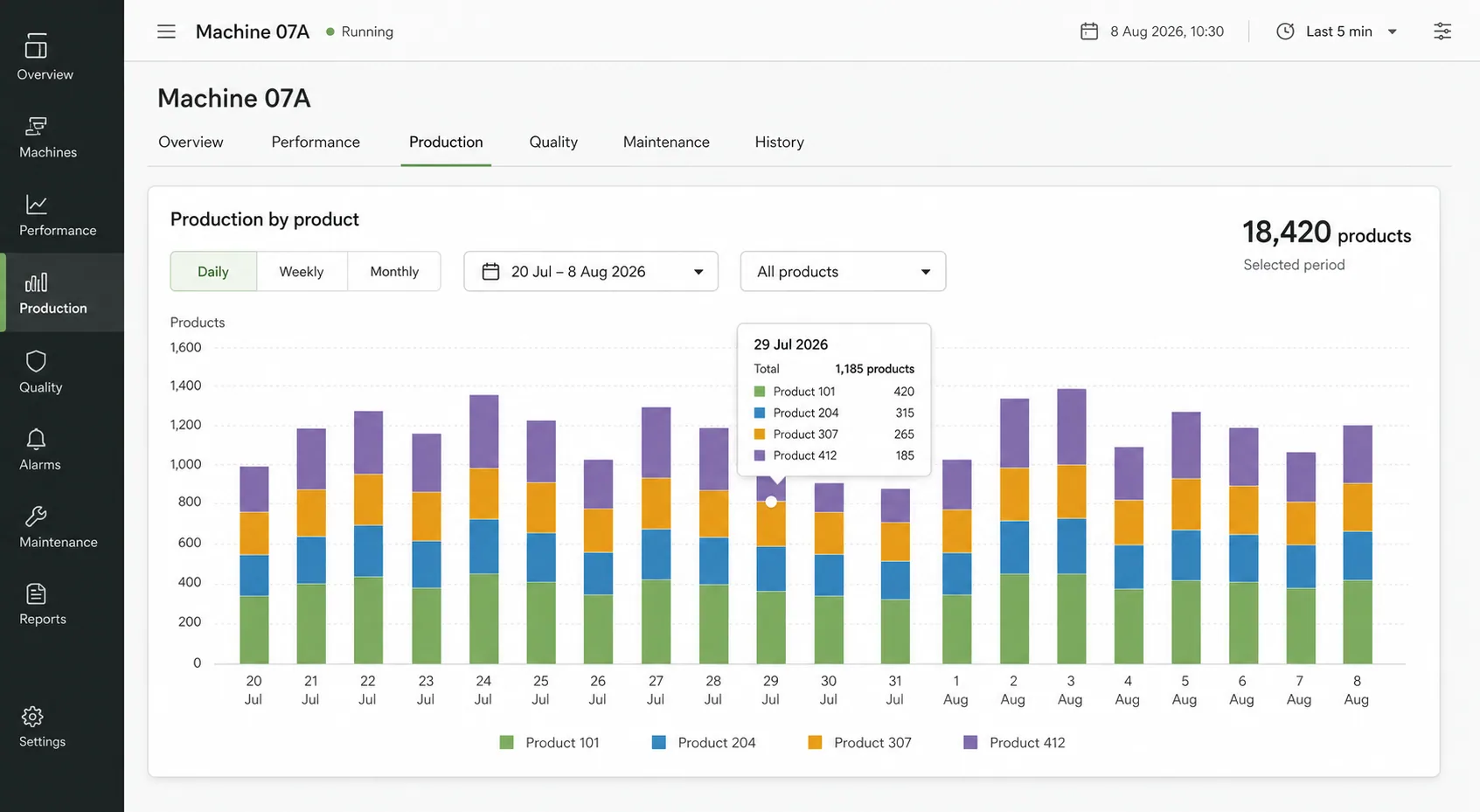
Production by product
Counts are tied to the product code that was running, so totals reflect what was actually made.
Production rate
Rate is measured over running time, giving a fair picture of how the machine performs when it is producing.
Plan against actual
Planners can enter the expected production for a machine and see progress against it through the shift.
Units that suit you
Report in the unit your team uses. Conversions are configured per machine and product.
Multiple sites
Each organisation can have several sites and machines, with each site's own time zone used for shifts and reports.
Built for the whole team
The right view for each role.
Access is by invitation and scoped to your organisation. Viewers read, planners plan, supervisors classify and administrators configure.
- Organisation-isolated access for every customer
- Viewer, planner, supervisor and administrator roles
- Works on a phone, tablet or control-room screen
- Weekly production report by product and day
Common questions
Machine monitoring, answered.
Which machines can Astara monitor?
Astara reads machines whose PLC exposes data over OPC UA. If your equipment cannot do that yet, you can begin with a structured CSV import and move to a live feed later.
Do we need to replace or reprogram our PLCs?
No. Astara reads signals your controller already produces: machine state, product code, production total and, optionally, the fault code. Access is read-only.
How is this different from a SCADA system?
SCADA is for operating and controlling equipment. Astara does not control anything. It records what happened and presents it as production and downtime history for the people improving the line.
How many machines can one gateway handle?
One site gateway keeps a separate connection to each configured machine and shares a single buffered uplink, so several machines at a site can use the same gateway.
Features
More from Astara
How it works
From a PLC signal to a decision-ready shift.
Read moreThe workspace
Dashboards, downtime reasons, plans and reports.
Read moreDowntime tracking
See where operating time went, and why.
Read moreOEE
The availability and performance evidence behind OEE.
Read morePLC data collection
Read-only OPC UA collection at the edge.
Read moreFood & packaging
Production visibility for food and packaging lines.
Read moreStart with one machine. Make the next shift easier to understand.
Bring a machine, a spreadsheet or simply a question. We'll show you what a clearer operational story can look like.
Book a demo